# Sniper
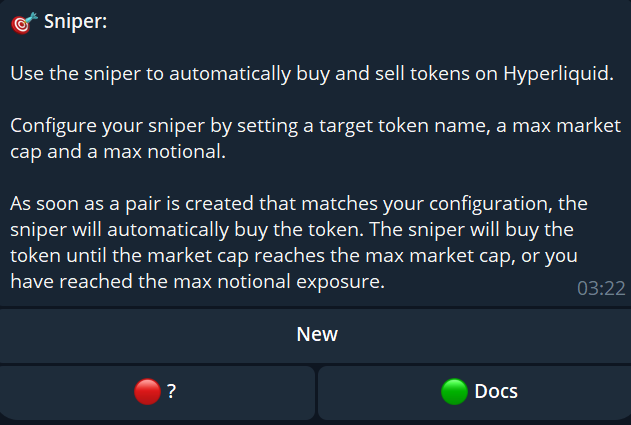
The **`/sniper`** command allows you to access and configure the **sniping widget**. This tool is designed to help you automatically buy tokens the moment they are listed, based on your personalized configurations.
***
### From the sniping menu, you can:
* Create new configurations.
* Activate or deactivate existing configurations.
* Customize your settings to match your trading strategy.
***
### Creating a New Sniper Configuration
1. **Start with the “New” Button**
* Click **“New”** to create a new sniper configuration.
* Enter a **config name** (It must be different from the token name!).
2. **Configure Sniping Parameters**\
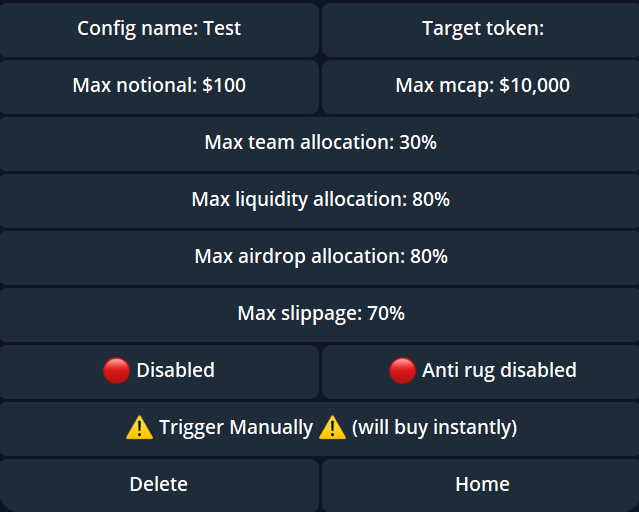
After naming your config, a detailed menu will appear with the following options:
* **Config Name**: A label for your configuration (does not affect the sniping process).
* **Target Token**: Enter the ticker symbol of the token you want to snipe.
* **Max Notional**: Set the maximum amount in USDC to spend on the token.
* **Max Market Cap**: Specify the maximum market capitalization (in USDC) for the token. The sniper will not buy if the token exceeds this value.
* **Max Team Allocation**: The sniper will only execute if the token’s team allocation is below this threshold.
* **Max Liquidity Allocation**: Ensure the liquidity allocation is within your acceptable range.
* **Max Airdrop Allocation**: Limit sniping to tokens with airdrop allocations below this value.
3. **Activate Your Configuration**
* To activate a config, click on the **“Disabled”** button to change it to **“Enabled”**.
***
#### Additional Features
* **Anti-Rug Function**:
* Enable this option to avoid sniping tokens flagged by the Hypurr Fun team as high-risk or potential rugpulls.
* **Trigger Manually**:
* Use this to instantly snipe a token when the launch time is known in advance.
* **Delete Configurations**:
* Remove unused or outdated configs using the **“Delete”** button.
* **Navigate Back**:
* Use the **“Home”** button to return to the config selection menu.
***
#### Why Use the Sniping Tool?
The **sniping tool** is essential for traders who want to **capitalize on newly launched tokens** quickly and efficiently, while maintaining full control over their **risk exposure**. With customizable parameters and safety features like **Anti-Rug**, it’s a powerful addition to your trading arsenal.