> For the complete documentation index, see [llms.txt](https://hfun.gitbook.io/hypurr-fun-docs/llms.txt). Markdown versions of documentation pages are available by appending `.md` to page URLs; this page is available as [Markdown](https://hfun.gitbook.io/hypurr-fun-docs/guide/getting-started.md).
# Getting Started
You can trade on Hypurr Fun through two platforms:
* **Telegram**: Start by [creating your account](/hypurr-fun-docs/guide/account.md) - Full trading experience with advanced features
* **Website**: Use your own EOA wallet (MetaMask, Rabby) at [hpump.trade](https://hpump.trade/)
**Next Steps**: Check out our guides for[ Hpump (trade & launch tokens)](/hypurr-fun-docs/guide/hpump.md), [HyperCore spot & perp trading](/hypurr-fun-docs/guide/hypercore.md), and [HyperEVM trading](/hypurr-fun-docs/guide/hyperevm.md)
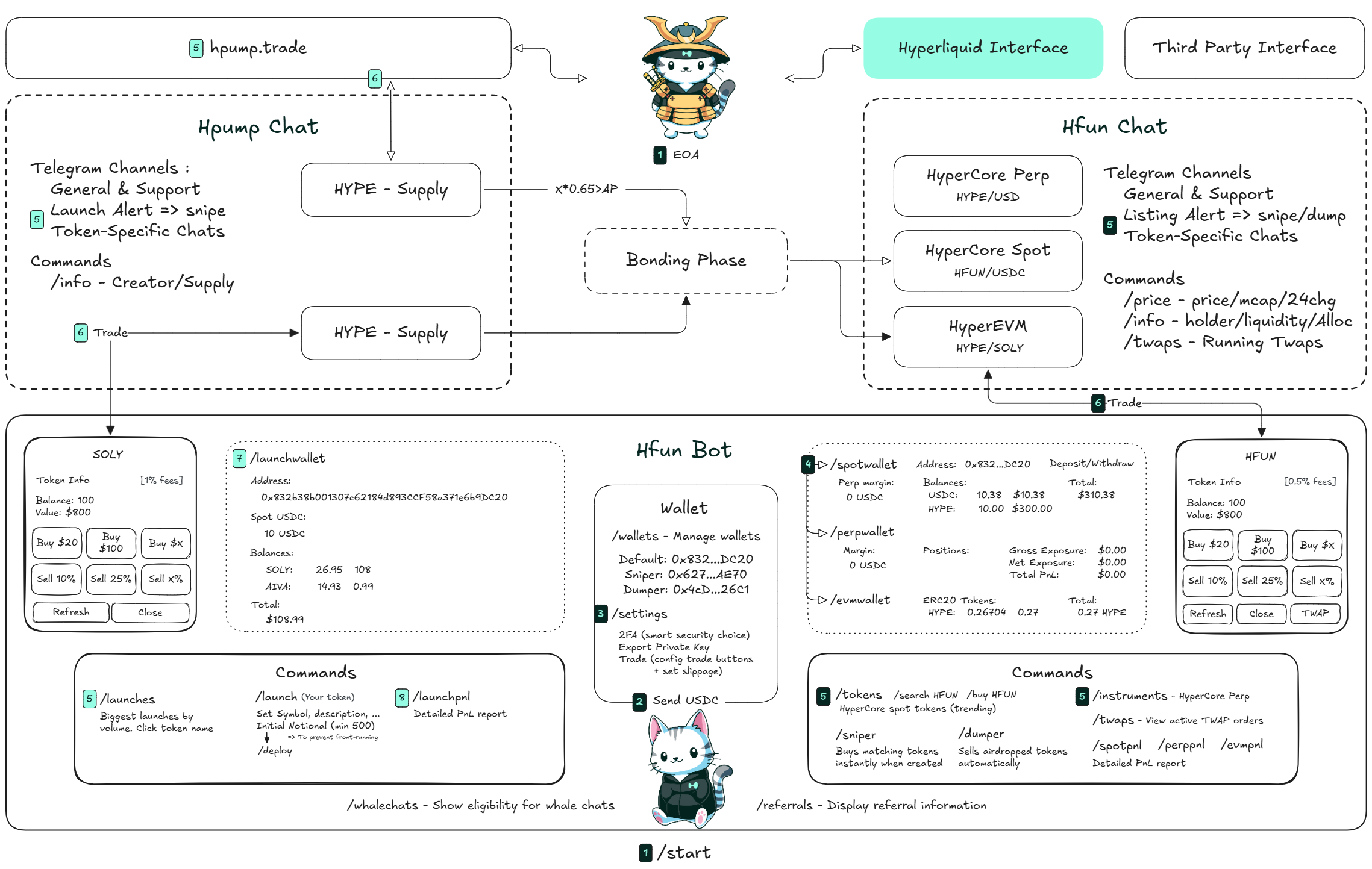
Platform Architecture & User Flow
***
### Links
* **Website**: [hypurr.fun](https://hypurr.fun/)
* **Hypurr Fun Bot**: [Launch Bot](https://t.me/HypurrFunBot)
* **Pre-Market (Hpump)**
* **Hypurr Pump Chat**: [Join the Chat](https://t.me/+GRIwAPnAUBk4ODE0)
* **Dashboard for launches**:
* **Live Market (Hfun)**
* **Hypurr Fun Chat**: [Join the Group](https://t.me/+SJRiO42rufBmODBk)
* **Explorer**: [Hypurrscan](https://hypurrscan.io/dashboard)
* **Portfolio Manager:** [app.hypurr.fun](https://app.hypurr.fun/)
### Bot Commands
#### **Hypurr Fun Bot**
* **Wallet Commands**
* **`/wallets`** - Manage and select your default wallet
* **`/settings`** - Configure wallet preferences, trade widget, and extract information
* **`/label`** - Add a label to a wallet address
* **`/labels`** - Show your wallet labels
* **`/spotwallet`** - View and manage your HyperCore spot wallet
* **`/perpwallet`** - View and manage your HyperCore perp wallet
* **`/evmwallet`** - View and manage your HyperEVM wallet
* **`/launchwallet`** - View and manage your HpumpCore and HpumpEVM wallet
* **Metrics**
* **`/launchpnl`** - Detailed PnL report for Hpump
* **`/spotpnl`** - Detailed PnL report for HyperCore spot trading
* **`/perppnl`** - soon
* **`/twaps`** - Shows all your active TWAP orders (HyperCore spot)
* **`/referrals`** - Display referral information
* **`/whalechats`** - Show eligibility for whale chats
* **Research**
* **`/search HYPE`** - Find HyperCore spot tokens by name
* **`/tokens`** - Display trending HyperCore spot tokens
* **`/launches`** - View and sort biggest launches by volume
* **`/instruments`** - Display trending perp instruments
* **Trade**
* **Hpump**
* **`/launches`** - HpumpCore launches, click on the name to see the trading widget
* **HpumpEVM** - Coming soon. Use [hpump.trade](https://hpump.trade) website
* **HyperCore**
* **`/sniper`** - Automatically buy HyperCore spot tokens when listed
* **`/dumper`** - Automatically sell HyperCore spot airdropped tokens
* **`/tokens`** - HyperCore spot tokens, click on the name to see the trading widget
* **`/instruments`** - HyperCore perp instruments, click on the name to see the trading widget
* **HyperEVM**
* Coming soon on TG
* **Launch**
* **HpumpCore**
* **`/launch`** - Launch directly from bot
* Use [hpump.trade](https://hpump.trade) website
* **HpumpEVM**
* Coming soon on TG
* Use [hpump.trade](https://hpump.trade) website
#### Hpump & Hfun Chat - Channel Commands
* **`/info`** - Holders, token supply, allocation and deployer information
* **`/price` -** Check price, TVL, market cap, and bonding progress.
* **`/twaps`** - View active TWAP orders for the asset
* **Charts** - Access detailed charts at [hpump.trade](https://hpump.trade)